Credit Notes and Partial Payments: A Practical Guide for Small Businesses
Two situations break most people's invoicing discipline: the client who pays some of the bill, and the sale that partially reverses — a return, a discount granted after the fact, a billing mistake. The wrong response to both is the same: quietly editing the original invoice. This guide explains how credit notes and partial payments actually work, why edited invoices cause GST trouble, and how Free Invoice Generator handles both without a spreadsheet on the side.
The golden rule: issued invoices are history
Once an invoice is sent, it exists in two places — your records and your client's. Edit your copy and the two no longer match, which surfaces at the worst possible time: GST reconciliation, an audit, or a payment dispute. Accounting has a better mechanism: leave the original untouched and issue a new document that adjusts it. That document is the credit note.
What a credit note is (and when you need one)
A credit note is a formal document that reduces the value of a previously issued invoice. Common triggers:
- Goods returned — client returns 3 of the 10 chairs; credit note for 3 chairs.
- Post-invoice discount — you agree to knock 10% off after a service issue.
- Billing error — wrong rate or quantity on the original; credit the difference.
- Deficient service — partial refund without touching the original record.
- Cancelled order after invoicing — credit note for the full value.
Under GST, credit notes are first-class citizens: they must reference the original invoice and they reduce your output tax liability in the return for the period. Issue them properly and the tax you overpaid comes back to you through GSTR-1.
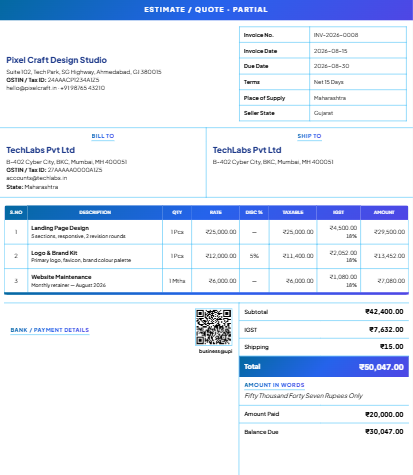
Creating a credit note in the editor
- Switch the document type to Credit Note — the same one-click switch used for invoices and quotes.
- Reference the original invoice number in the dedicated field, so the paper trail is explicit.
- Add the lines being credited — same descriptions, same HSN codes, same tax rates as the original, with the quantities or amounts being reversed.
- The credit note gets its own sequential number (separate series from invoices), and prints on the same A4 templates with the correct title.
The result reads unambiguously: this document reduces invoice INV-2026-0031 by ₹8,260 including 18% GST. Your client books it, you book it, the tax return reflects it, and nobody edited history.
Partial payments: keep the balance visible
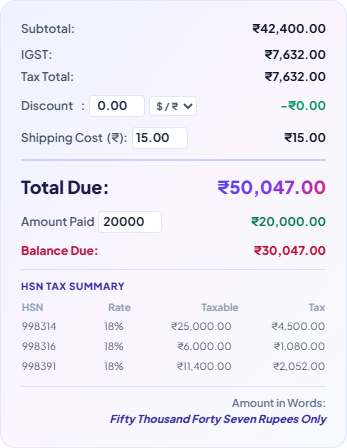
Clients pay in instalments constantly — 50% advance, milestone payments, or the classic "paying half now, rest next week". The mistake is tracking the remainder in your head or a chat thread. The editor has a first-class field for this:
- Enter the Amount Paid and the invoice automatically shows the Balance Due — on the sheet itself, in Preview, PDF, print, and the public share link.
- The amount in words reflects the true document total, while the payment section makes the outstanding portion impossible to miss.
- When the final payment lands, mark the invoice paid from the Billing Dashboard and your client's ledger updates.
Which tool for which situation?
| Situation | Right response | Wrong response |
|---|---|---|
| Client paid 50% advance | Record amount paid; invoice shows balance due | Two separate half-invoices |
| Client returned part of the goods | Credit note referencing the invoice | Editing quantities on the original |
| Agreed discount after invoicing | Credit note for the discount amount | Reissuing the invoice with a lower total |
| Typo caught before sending | Just fix the draft — it is not issued yet | A credit note (unnecessary) |
| Invoice fully cancelled after sending | Credit note for the full value | Deleting the invoice |
Tracking it all: the receivables picture
Individual documents are only half the job — you also need to know who owes what overall. With cloud sync enabled, the Billing Dashboard maintains client-wise ledgers: every invoice, every payment recorded against it, and the running outstanding per client. The "should I take more work from this client?" question gets answered by a number, not a feeling. Local-only users get the same discipline through the invoice list and CSV export — pull the file monthly and reconcile in a spreadsheet.
GST timing: when a credit note must be issued by
Credit notes have a deadline most people learn about too late. Under GST, a credit note against an invoice from a given financial year must be declared by 30 November of the following financial year (or the date of filing the annual return, whichever is earlier) for the tax adjustment to count. Miss the window and you can still square things commercially with the client, but the GST you paid on the reversed value stays paid. Practical takeaway: when a return or post-sale discount happens, raise the credit note that week — not at year-end cleanup. The document takes two minutes; the deadline forgives nothing.
Numbering credit notes properly
Credit notes need their own unbroken series, exactly like invoices — CN-2026-0001, CN-2026-0002, and so on. The editor maintains this automatically as a separate counter, so issuing a credit note never disturbs your invoice sequence. Two small disciplines on top: always fill the against invoice reference (an unanchored credit note is an audit question waiting to happen), and never reuse a credit note number even if one was issued in error — cancel it with documentation and move to the next number, the same rule that applies to invoice numbering.
Three habits that prevent 90% of payment chaos
- Record payments the day they arrive. A ledger that lags reality is worse than no ledger — you will chase paid invoices and miss unpaid ones.
- Never negotiate by editing. Any post-issue change to value goes through a credit note. Your future self at tax time will be grateful.
- Restate the balance in every follow-up. "₹12,000 received, ₹12,000 pending on INV-2026-0031" — clarity collects faster than politeness alone.
What about debit notes?
The mirror image: where a credit note reduces an invoice's value, a debit note (or supplementary invoice) increases it — used when you under-billed, or when a price escalation clause kicks in after invoicing. The same principles apply: reference the original document, keep a separate number series, and never edit the issued invoice itself.
Invoices tell clients what to pay. Credit notes and payment records tell the truth about what happened. Keep all three accurate and audits, reconciliations, and awkward money conversations all get dramatically shorter.
Related reading: payment terms that get you paid faster, and the GST invoice guide for the compliance side of every document you issue.