Invoice vs Quote vs Estimate: When to Use Each (With Examples)
Every freelancer eventually sends an invoice when they meant to send a quote — or worse, does the work with no document at all and then argues about the price later. The two documents look similar, share most of their fields, and are often built in the same tool. But legally and practically they do very different jobs. This guide covers the difference between an invoice and a quote, where estimates and proforma invoices fit, and how the Free Invoice Generator lets you flip between them without retyping anything.
The one-line difference
A quote says "this is what it would cost." An invoice says "this is what you now owe."
A quote is an offer you make before the work. The client can accept it, negotiate it, or ignore it. An invoice is a formal request for payment after (or during) the work, with a due date and tax consequences. Once issued, an invoice enters your books; a quote does not.
Quote vs estimate vs proforma vs invoice
| Document | When it is sent | Binding? | Goes in your books? |
|---|---|---|---|
| Estimate | Early discussion, price is a ballpark | No — expect ±10–20% movement | No |
| Quote / Quotation | Before work, price is fixed | Yes, once accepted, for the stated validity period | No |
| Proforma invoice | Before delivery/payment, often for advance payment or imports | Not a tax invoice | No |
| Tax invoice | On or after supply of goods/services | Yes — creates a legal payment obligation | Yes, with GST liability |
The practical rule: if tax needs to be reported and payment is due, it is an invoice. Everything before that moment is some flavour of quote.
When to send a quote first
- Custom or scoped work — design projects, development sprints, repairs, events. Agreeing on price first prevents 90% of payment disputes.
- Price-sensitive clients — a written quote with a validity date ("valid 15 days") creates gentle urgency.
- Anything involving materials — lock the rate before material costs move on you.
A good quote carries the same line items as the future invoice: description, quantity, rate, and the tax that will apply. That is exactly why our editor uses one document model — the quote you write today becomes the invoice you send next week, with the same items, the same client details, and a new number.
How the switch works in the editor
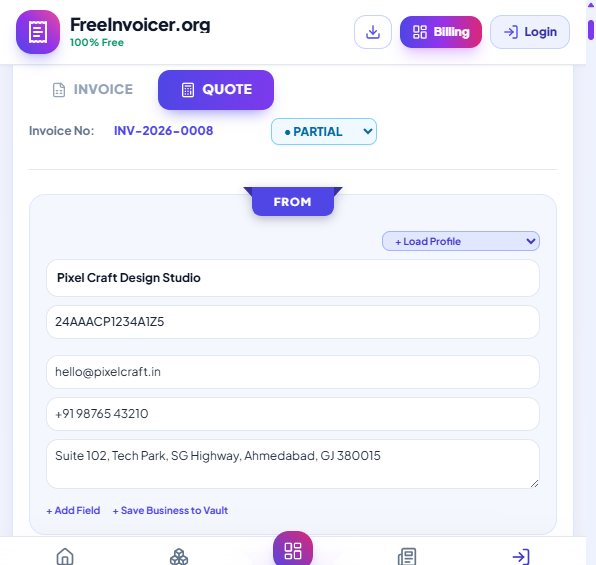
Above the invoice paper there is a simple Invoice / Quote switch. Select Quote and the document title, numbering, and wording adjust; your data stays put. When the client approves:
- Open the same draft from your Local Saved Drafts (or Billing Dashboard if you use cloud sync).
- Flip the switch back to Invoice.
- Check the issue date and payment terms — Net 7 and Net 15 auto-fill the due date.
- Preview and share. The template and all details carry over.
No copy-paste, no second tool, no "final_v3_REAL.pdf".
What a strong quote must contain
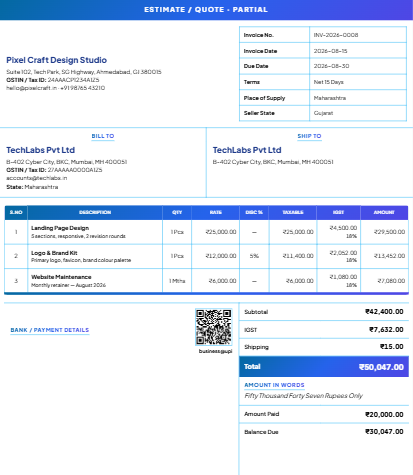
- Validity period — "Prices valid until 30 September 2026." Without this, a client can accept a six-month-old price.
- Scope description — each line item should be specific enough that "that wasn't included" arguments cannot start.
- Payment terms preview — say now that the invoice will be Net 15 with 50% advance; surprises kill deals late.
- Taxes shown separately — quote ₹50,000 + 18% GST, not "₹59,000 all-in", so the client sees the real comparison against other quotes.
- Your GSTIN and contact details — serious buyers check these before approving vendors.
Invoice timing: when exactly should you convert?
For services in India, a tax invoice should generally be issued within 30 days of completing the service. For goods, on or before delivery. Practically, we suggest a simpler habit: convert the quote to an invoice the same day the client says yes if you take advance payments, or the day you deliver if you bill on completion. Record any advance with the partial payment field so the invoice always shows the true balance due.
A walkthrough: one project, three documents
Here is how the documents chain together on a real job — say, a ₹60,000 website build:
- Day 1 — Estimate (verbal or rough). "Something like this usually runs ₹50–70k depending on pages." No document needed yet, or a quick estimate if the client wants it in writing.
- Day 3 — Quote QT-2026-0007. Five line items, ₹60,000 + 18% GST, valid 15 days, terms noted: 50% advance, balance Net 7 on delivery. Client approves on WhatsApp.
- Day 4 — Invoice INV-2026-0031 (advance). The quote flips to an invoice; the advance is recorded as amount paid when it lands, and the sheet shows the running balance.
- Day 25 — Delivery and final settlement. The remaining balance is due Net 7; a WhatsApp reminder with the share link lands on day 8 if needed.
One document model, one tool, zero retyping — and at every step both sides know exactly which stage the money conversation is in.
Following up on quotes (without being annoying)
Quotes go stale silently — clients rarely write back to say no. Two follow-ups are plenty: a short check-in at the halfway point of the validity window ("Any questions on the quote? Happy to adjust scope"), and a final note two days before expiry ("The quoted prices hold until Friday — after that I'll need to re-quote"). The expiry message is not a pressure tactic; material costs and your calendar genuinely change. Quotes that expire cleanly also protect you from the client who reappears in November expecting March prices.
Frequently asked questions
Can a quote and its invoice have the same number?
Keep the series separate — quotes as QT-2026-0001, invoices as INV-2026-0001. The editor numbers each type independently, and locks invoice numbers once used so duplicates cannot slip through.
Is a quote legally binding?
Once accepted and within its validity window, a quote is generally enforceable as an agreed price. That is a feature, not a risk — it protects you as much as the client.
Do quotes need GST?
A quote should show the GST that will apply so there are no surprises, but it does not create a GST liability. Only the tax invoice does that.
What if the client wants changes after accepting the quote?
Scope changes get a revised quote with a new number, not silent edits to the accepted one. It keeps the paper trail honest and — usefully — makes the client see the price impact of each change before it happens rather than disputing it on the final invoice.
Related reading: the freelancer invoice checklist covers all twelve fields a payable invoice needs, and the payment terms guide shows which terms actually get you paid on time.