8 Free Invoice Templates: Classic and Corporate A4 Designs Compared
The right invoice template does two quiet jobs: it makes your business look established, and it makes the document effortless to read for the person approving payment. Free Invoice Generator ships with eight free invoice templates — four classic designs and four corporate colourways — all print-ready A4, all included at no cost, and all driven by the same data so switching between them never means retyping. This guide compares every template and helps you pick the one that fits your business.
One document, eight looks
Before the comparison, the key design decision worth knowing: templates in this app are presentation only. Your line items, taxes, payment details, and totals live in one place; the template is a skin applied at output time. Practical consequences:
- Switch templates any time — even after the invoice is finished — from the Document Customizer dropdown.
- Preview, print, and PDF are pixel-identical. The sheet you see in Preview is exactly what prints and exactly what downloads — same fonts, same underlines, one full A4 page, no surprises.
- All templates carry the complete field set: logo, GSTIN, HSN columns, tax breakup, UPI QR code, bank details, signature block, and policies.
The classic family
| Template | Look | Best for |
|---|---|---|
| Default (Black & White) | Crisp monochrome tax-invoice layout — solid black header bands, maximum contrast | Corporate clients, government work, anywhere conservative wins |
| Gradient | The same trusted layout with the header bands in an indigo→violet→pink gradient | Studios, startups, creators who want colour without redesign |
| Emerald | Classic layout in deep green tones | Finance, wellness, agriculture — anywhere green reads as "trust" |
| Ocean | Classic layout in calm blue tones | Tech services, consultants — the safest colour choice in business |
All four share the same bones: a bold document title, a two-column parties section (Bill To / Ship To), a full-width items table with per-line tax, and a structured footer carrying bank details, notes, policies, the QR code, and the signature block with its "For Your Company" line. If your accounts-payable audience is traditional, the Default black & white is the one template that has never once looked wrong on anyone's desk.

The corporate family
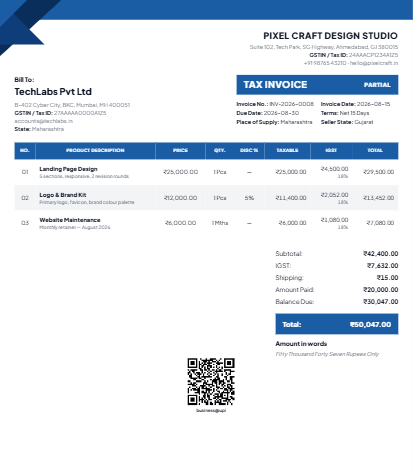
The corporate design is a different layout, not just different colours: a tinted header panel, an "Original for Recipient" marking (expected on formal Indian tax invoices), and a denser, registers-and-ledgers feel that larger organisations recognise instantly. It comes in four colourways:
- Corporate Blue — the standard-issue big-company look; ideal for B2B service firms.
- Corporate Slate — cool grey; understated and modern, pairs well with minimalist brands.
- Corporate Wine — deep maroon; distinctive without being loud, good for premium services.
- Corporate Forest — dark green; grounded and established, popular with trading and manufacturing businesses.
How to choose in 30 seconds
- Who approves your invoices? A finance department → Default or any Corporate colour. A founder or individual client → Gradient, Emerald, or Ocean add personality safely.
- Do you have brand colours? Match them: blue brand → Ocean or Corporate Blue; green → Emerald or Forest; vivid/creative → Gradient.
- Do you print a lot? The Default black & white uses the least ink and photocopies perfectly — a real consideration for shops printing at the counter.
- Formal Indian tax invoice needed? The Corporate family's "Original for Recipient" marking matches what large buyers expect.
Then stop optimizing. A consistent template on every invoice builds more recognition than the perfect template chosen twice a year. Pick once, and let clients learn to recognise your paperwork at a glance.
What every template includes (no paid tiers)
- Logo and signature — upload once, rendered on every design. See the branding section of the checklist.
- Full GST support — CGST/SGST or IGST columns appear automatically based on your supply type.
- 45+ currencies — symbols and number grouping adjust per currency, including Indian-style ₹1,16,000 grouping.
- UPI QR code — scannable straight off the printed page; details in the payment terms guide.
- Amount in words, payment terms with auto due date, PO number, shipping address, and policy sections.
- Quote and credit note modes — every template renders quotes and credit notes with correct titles and numbering.
Why "free template" here means actually free
Most invoice-template sites hand you a Word file that breaks the moment your description wraps to two lines, or a "free" generator that watermarks the PDF until you subscribe. Here the templates are part of a working editor: totals calculate themselves, tax logic is built in, and the PDF downloads at print quality with no account required. The app is local-first, so even the rendering happens on your device — you can preview all eight designs with airplane mode on.
Fine-tuning beyond the template
The Document Customizer controls more than the design family. A few settings worth knowing about, all of which apply to whichever template you pick:
- Show or hide columns — no discounts to give? Hide the discount column and the table tightens up. Same for shipping and other optional fields: the layout reflows so empty features never leave awkward gaps.
- Document title — "Tax Invoice", "Invoice", "Proforma Invoice" — set the wording your clients expect.
- Footer sections — bank details, notes, guarantee/warranty/refund policies, and the UPI QR each render only when filled, so a minimal invoice stays minimal.
- Language of the layout stays consistent — whichever template you use, field labels sit in the same relative positions, so a client who received your Ocean invoice last month reads your Corporate Blue one just as easily.
One habit we recommend: set your template once in the customizer and let it persist. It is remembered with your profile, so every new document — invoice, quote, or credit note — comes out wearing your colours without a single extra click.
Frequently asked questions
Can I switch templates after sending an invoice?
You can re-download the same invoice in a different design any time — the data does not change, only the presentation. For consistency, though, keep one template per client relationship.
Are the templates A4 or US Letter?
A4 (210 × 297 mm), the standard across India, Europe, and most of the world. The layout is tuned so a typical invoice fills exactly one page — no orphaned footer on page two.
Do colours print correctly?
Yes — the print output is generated from the same sheet as the preview. On a black-and-white printer, the coloured templates degrade gracefully to clean greys, though the Default template remains the monochrome champion.
Next: put your chosen template to work with the two-minute GST invoice guide, or set up WhatsApp delivery for the finished document.